
Vibe Coding An Operating Budget
Working with Agents and Numbers
Do you want to know how I generated a CPA-approved budget from scratch in 2 hours for $1 in generative AI costs? Read on. In this post I share with you how I worked with Generative AI agents (GenAI, or agents) on that exact project. I want you to get a sense of how I work with GenAI to solve real problems.
And I have a confession to make. Despite the fact that I have two engineering degrees and eleven patents, I am not very good at accounting and finance. This still embarrasses me. I studied calculus, differential equations, and statistics in college. Accounting is mostly arithmetic for crying out loud!
Of course it’s not the basic math that is the problem. It is the relationships between expense categories and numbers and how they interact that I find confusing. Conceptually I understand what is going on, but translating that into specific, financial terms represented on a spreadsheet projected over time? Check please. I’d like to go back to studying calculus.
While I do know how to read a financial statement and balance sheet, putting together an operating budget from scratch for an organization I have never run? Hopefully you will cut me some slack if I share that I find that daunting. I’ve never done it.
This is where I turned to agents. I use them to guide me, but also to help me understand the process. I turned to my Vibe Coding environment because I wanted to create real excel sheets, with formulas included. You see, Python has a set of packages to create and modify excel spreadsheets.1
Therefore, my development plan is to use this “loop”:
- Give the agent specific directions about the nature of the project.
- Save progress and learnings in a MEMORY.md2 context file.
- Tell the agent my intention.
- Ask the agent how it recommends proceeding.
- Iterate with the agent until we have a working model we can present.
Most of the work will happen with Step 5, the iteration. Step 5 is the heart of Vibe Coding. I am having a conversation with the GenAI about not only how to proceed, but how to incrementally modify and improve what was implemented. The agent codes, I critique. That process looks like:
- Ask the agent to implement a change.
- Test the change.
- If the change succeeds, jump to step 6.
- If the change fails, or throws an error, copy and paste the error in the agent window and ask for help.
- Use the answer from the agent to jump back to step 1.
- Update all memory artifacts, and check in the change.
- Proceed to the next change.
How I Started
My first prompt started with this:
Good morning. I need your help to create an operating budget for a non-profit kids club. I have never done this before, so I need you to act as a supportive chief financial officer with a lot of experience working with non-profits. I want you to coach me through how to build this financial plan. Please generate a check list, or a plan we can follow to make sure we end up with an Excel spreadsheet in XLSX format that we can use for financial projections. Please ask me any clarifying questions before you proceed.
I always ask that last question in case I missed something vital for the agent to know.3 Sometimes the agent asks me questions, sometimes it just gets to work.
Asking the agent to check with you before it starts working is an example of human-agent collaboration.
Our first iteration produced four documents:
- Intake Questionnaire (10 sections of discovery questions)
- Excel Workbook (7 interconnected sheets with named ranges and formulas)
- Narrative Overview (“kid-friendly guide” to demystify budgeting)
- Workplan (detailed phase-by-phase checklist)
A Word About Execution Approvals
As the agent progresses, it will suggest work, and you will have to approve it before it can do anything. This is critical. The agent cannot execute commands on your computer unless you allow it.
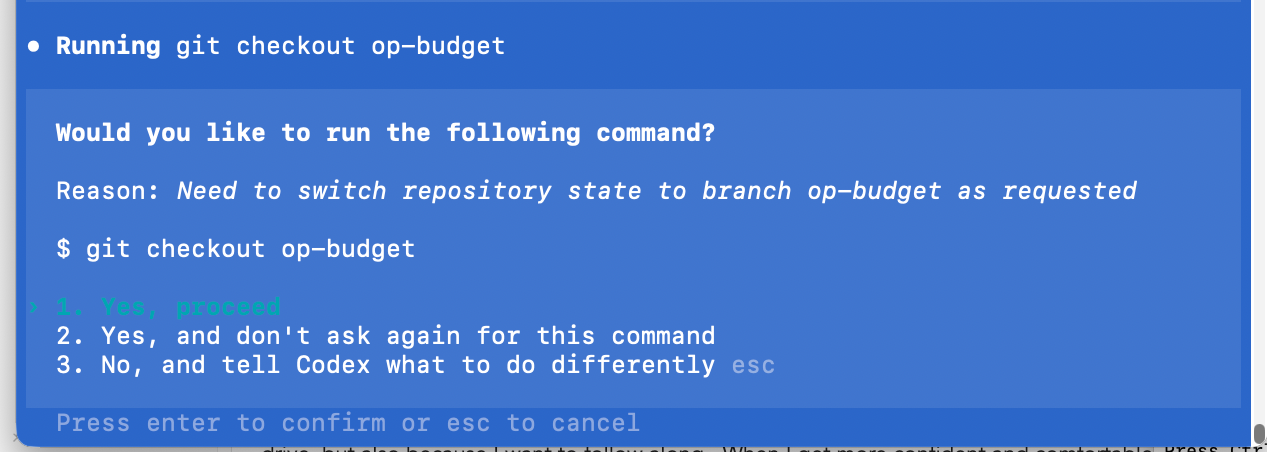
As you can see in the screenshot, you have three choices. They are:
Yes, proceedYes, and don't ask again for this command, andNo, and tell Codex what to do differently.
These translate into the following permissions:
- One time only
- Every time from now until the end of the session.
- Cancel and do something different.
I typically hit 1, the first time I go through a process. Not just because I’m paranoid about having an agent write files on my hard drive, but also because I want to follow along. When I get more confident and comfortable, I will hit 2, so the agent can proceed whether I am paying attention or not.
This is very risky - please make sure you know and understand what the agent is doing before you give it carte blanche to run commands on your machine.
I highly suggest during your first few vibe coding sessions, you only use 1 - a single execution approval so you can follow along. But once you get comfortable approving file creation and command execution in your command line environment, you are ready for the real magic to start.
The Magic
I presented the first draft of the operating budget to the club manager who I was helping. The screenshot below shows that the financial model assumed that the number of staff depended upon the number of kids. 12-15 kids per staff member. This sounded reasonable to me.

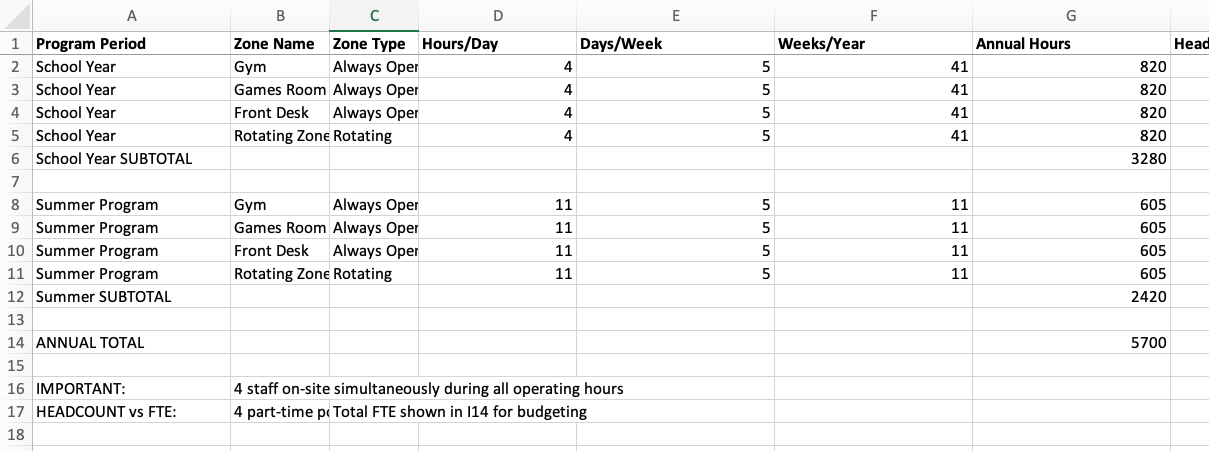
However, the manager pointed out that his club was staffed by zones. No kid can be unsupervised, and different rooms in the club serve different functions (Gym, Games, Art, Music, Computers etc). So instead of 15 kids per staff, the club had one staff for each active zone that day. The gym and the game room were always open, but the others depended upon the daily event programming.
This one change meant the spreadsheet would have to be rebuilt. Normally this is where most humans throw up their hands in frustration. However, redoing work is where vibe coding shines.
Armed with a better understanding of how the club actually operated, I could give the agent this prompt:
Hey, I just learned that the club is staffed differently than our assumptions. Instead of it being 15 kids per staff member, the club is staffed by zones. Can you modify the model and formulas for the new understanding?
The agent asked me questions which I answered. We went back and forth until it understood the requirements, and it updated the XLSX sheet. The results are on the screenshot below. You can see that the structure is radically different, but more importantly the formulas and interconnections had also been revised to integrate the new staffing model.
This was absolutely magic
Restructuring a financial spreadsheet, even one as trivial as this is always a pain. It’s the kind of drudgery that keeps me out of accounting. But in 90 seconds I had a brand new spreadsheet with the new assumptions ready to go.
For me, this is what makes Vibe Coding powerful and fun. The agent never complains about having to redo the work. Instead of getting stuck with a model someone poured a lot of time into, you can simply tell the agent to “fix it”, or “modify it”, or worse case, just start over.
And because I did not make the sheet, I had no emotional attachment to it either. I was like, “fine, rebuild it.”
By using git check-ins and pushes, we could back up each change (and recover them if we wanted to). We could fearlessly explore our way through the project check list, gathering data, costs, pricing, making adjustments, revising models as we learned.
Starting from absolutely nothing, in less than two hours we had an operating budget that a CPA reviewed and felt that it was clear, concise and made sense. It also happened to be mistake free. (I wasn’t sure that last part was going to happen - which is why I asked a professional to check our finished work.)
Summary
The moral of the story here is that agents can do three powerful things at the same time, which you don’t often find with humans.
- They can act as experts who coach you through a complex piece of work.
- They can actually do the work with you and for you.
- They don’t grumble if they have to redo the work.
Oh, and they are cheap. If you take the value of my time, the value of the club managers time, and the CPA time, we spent well over $100 an hour on this project in people. The agent? It cost about 10 cents an hour4. That’s right. At most it cost me $1 for that single project.
When I compare that to the thousands of dollars I spent on consultants who expected to direct my staff to do the work, the value I get here is insane. GenAI are qualified across a wide range of skills. They might hallucinate, but if you manage them like people, paying attention, following along, participating, you can complete quite a bit of work in a short amount of time at a very affordable price.
Why Not Use AI Inside the App?
You could probably create a spreadsheet in Google Docs, or directly in excel, and use Gemini, or Copilot to help you. I imagine you could build pretty much the exact same sheet I built. Why didn’t I do that?
Three reasons:
- Supporting Documentation.
- Context preservation.
- Version control.
If I only worked in Excel or Google Sheets, I would lose all the supporting documentation and the larger context. It is preserving the environment that makes me more productive. I want my disparate files together in the same place, I do not want to hunt them down across a myriad of applications. (Yes it still annoys me that I can only store Canva files in Canva.)
Finally, by using GitHub, I can get back to any moment in the project. Sure, Excel, and Google Sheets have versions - but only on a per document level. This approach lets me preserve everything in the folder at the time I check in. The Vibe Coding methodology gives me control over all my files, plus flexibility and transparency.
End Notes
-
Node.js also has libraries that can create, read, and write XLSX files. ↩︎
-
Sometimes this also called a memory artifact. ↩︎
-
One challenge I have been having with ChatGPT 5 lately is that it does not ask any questions, it races ahead with an imperfect and off-base understanding the requirements and I have to pull it back and sometimes start over. ↩︎
-
In oversimplified napkin math I took $20 a month for the service, divided by 30 days in the month, divide again by 8 hours in the day and that cost is about 08.33 per hour. I rounded up to 10 cents. ↩︎